Creative Back to School Flyer Design: A Practical Guide
The back-to-school season brings a familiar mix of excitement and urgency. Whether you're a teacher preparing your classroom, a small business owner running a local shop, or a community organizer planning an event, you need something that captures attention fast. A well-designed flyer or poster does exactly that—it communicates your message in seconds while setting the right tone for what's ahead.
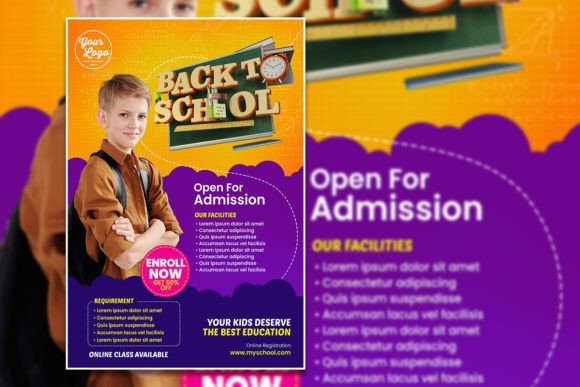
That's where a Creative Back to School Flyer or Poster template becomes genuinely useful. Instead of starting from scratch or settling for generic clip art, you get a professionally designed foundation that you can make entirely your own. The one we're looking at today comes as an editable PSD file, which means every single element—text, colors, images, and layout—can be adjusted to match your specific needs.
What Makes This Template Stand Out
The design itself strikes a balance between playful and polished. It doesn't look like it was thrown together in five minutes, but it also doesn't feel stiff or corporate. That's a sweet spot that's surprisingly hard to hit on your own, especially if design isn't your primary skill. The layout guides the eye naturally from the headline down through the details, which is exactly what a good flyer should do.
At 2000 by 3000 pixels with a 4:6 aspect ratio and 300 DPI resolution, this template is built for both print and digital use. You can print it as a standard poster or resize it for social media without losing quality. The RGB color mode keeps things vibrant on screens, and the organized PSD layers mean you won't spend twenty minutes hunting for the right element to edit.
What I appreciate most is the practicality. The text is fully editable—just select it with the text tool in Adobe Photoshop and type your own message. Want to swap the photo? Drop in your own image for a more personalized, authentic look. These small adjustments transform a template into something that actually represents your brand or event.
Real-World Uses Beyond the Classroom
Think about how many situations call for a back-to-school announcement. Retail stores run sales on supplies. Tutoring centers promote their services. Libraries announce reading programs. Dance studios and sports leagues open fall registration. Churches and nonprofits organize backpack drives. Even bloggers and content creators use seasonal graphics to stay relevant with their audience.
This template works across all of those scenarios because the design is versatile enough to adapt. A small business owner could use it as a social media post template to announce a back-to-school promotion on Instagram or Facebook. A teacher might customize it for a classroom door display. A marketer could repurpose it as a digital ad or an email header.
The flexibility extends to branding, too. If you run a tutoring business, you can match the flyer's colors to your logo and use your brand fonts. If you're a content creator, you can add your watermark and website URL. The template becomes a starting point for consistent visual communication rather than a one-off design that feels disconnected from everything else you put out.
Getting the Most Out of Editable Design Assets
Working with an editable PSD template is straightforward, even if you're not a Photoshop expert. Open the file, click on the text layers, and replace the placeholder copy with your own. Adjust the colors if you want. Swap the background image. Move elements around if the layout doesn't quite fit your content.
A few practical tips can make the editing process smoother:
- Keep your message focused. A flyer isn't a brochure. Stick to one main call to action—whether that's "Shop Our Sale," "Register Now," or "Join Us Saturday."
- Choose fonts that match your tone. If the template includes a playful script, that works great for a kids' event but might feel out of place for a professional tutoring service. Don't be afraid to change the font to something that fits your audience.
- Use high-quality images. If you're replacing the photo, make sure it's sharp and well-lit. A blurry or poorly composed image can undermine an otherwise great design.
- Test readability at different sizes. Zoom out on your screen or print a small test copy. If the text is hard to read when the flyer is posted on a bulletin board or viewed as a thumbnail on a phone, adjust the size or contrast.
Design Consistency and Brand Recognition
One of the biggest advantages of using a professional template as your starting point is visual consistency. When your back-to-school flyer matches the look and feel of your other marketing materials—your website, your business cards, your social media posts—people start to recognize your brand instantly. That recognition builds trust over time.
Think about the brands you notice immediately in a crowded feed or on a busy street. It's rarely because of a single brilliant design. It's because they show up consistently with the same colors, the same style, and the same level of quality. A template like this gives you that quality baseline without requiring you to hire a designer for every seasonal campaign.
For small business owners and entrepreneurs especially, this matters. Your time and budget are limited. Having a reliable design asset that you can customize quickly means you can stay active with your marketing without it becoming a full-time job.
Print, Digital, and Everything In Between
The beauty of a well-made PSD template is its adaptability. Print it at full size for a storefront window or a community bulletin board. Export a smaller version for a website banner. Crop it differently for an Instagram story or a Pinterest pin. The high resolution and organized layers make these adjustments painless.
If you're running a back-to-school sale, you might create a whole series of materials from this one template—a poster for your shop, a flyer for handouts, a social media graphic for your Facebook page, and an email header for your newsletter. Starting from a consistent design foundation saves hours and keeps everything looking cohesive.
The file format also matters. Because this is a Photoshop PSD file, you have complete control over every layer. That's different from a locked PDF or a flattened JPEG where you can only add text on top. Here, you can genuinely reshape the design to serve your goals.
Making It Yours
The best design templates disappear into the final product. After you've swapped the text, adjusted the colors, and added your own imagery, the result should look like something you created from scratch. That's the real value of a creative back to school flyer or poster template—it gives you a professional starting point so you can focus on the message instead of wrestling with layout and composition.
Whether you're promoting a school event, advertising a seasonal sale, or simply building out your content calendar with timely graphics, having an editable, high-quality template on hand makes the process faster and the results better. Download it, open it in Photoshop, and start making it yours.